
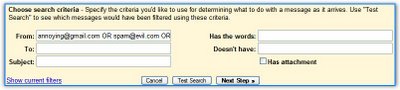
Gmail's spam filters aren't too good for you, it's time to create a blacklist. How to do that in Gmail?
1. Go to Contacts, click on Groups and create a new group (let's say "Blacklist").
2. Click on "All contacts", check the email addresses you don't like and add them to the group (at the bottom of the window).
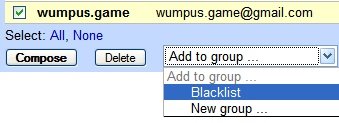
Each time you send a message to someone not in your Contacts list, Gmail will automatically add the person for you. So if you didn't reply to a person, you'll have to add the mail address in the last step.
3. Go to Groups / Blacklist and click "Compose to group". Copy the text from the "to" field.4. Paste it here and click "convert". Then click on the resulting text and copy it. (This is a simple JavaScript. No address will be sent to a server.)
Do Comment.........!!


No comments:
Post a Comment